


Instant Voice Translate
4.83.37K Reviews
App Specs
- Version
- 15.0.0
- Updated On
- License
- Free
- Downloads
- 10,000,000+
- Developer
- Erudite
- Categories
- Travel & Local
- Platform
- Android, iOS
Screenshots

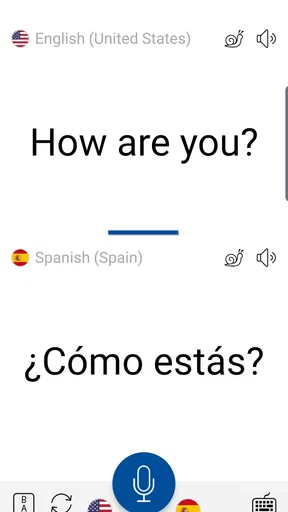
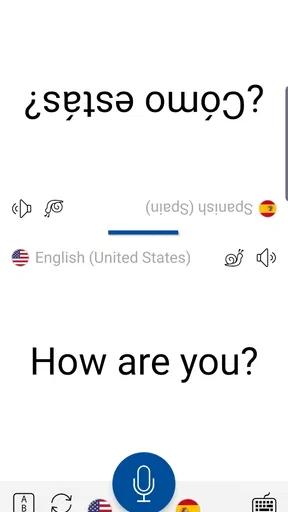
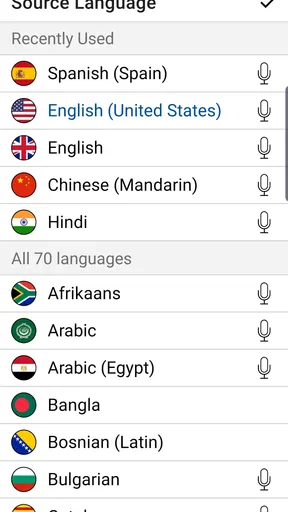
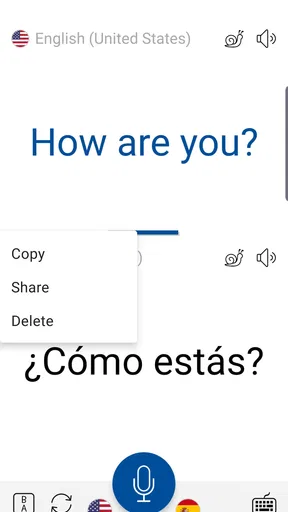
 Analysis by AppCompare
I get the most value from Instant Voice Translate when I treat it as a conversation aid, not a magic interpreter. Its central appeal is straightforward: I can speak, show the translated result, and use the phone to help two people understand one another face to face. That can make a small but important exchange feel less intimidating, whether I’m asking for directions or sorting out a practical detail while traveling.
Why spoken translation changes the interaction
Typing a sentence into a translator can work well when I have time and a free hand. In a conversation, though, the extra steps can make an ordinary question feel formal or slow. A voice-led exchange is more natural: I can focus on what the other person is saying, pause to check a translated phrase, and respond without having to compose every line from scratch.
That convenience has limits. A translated sentence is still an interpretation, so I wouldn’t rely on it to settle a legal issue, explain a complicated medical history, or negotiate an important contract. For those situations, a qualified human interpreter is the safer choice. For everyday exchanges, the app is more useful as a bridge than as a replacement for careful listening and clarification.
Making a face-to-face exchange easier
For the clearest result, I’d keep each spoken turn short and stick to one idea at a time. Instead of giving a long explanation about a missed connection, I’d ask one question, wait for the other person’s reply, and then continue. This gives both people a chance to catch misunderstandings before they grow, and it makes the translated exchange easier to follow.
It also helps to show the translated text rather than expecting someone to listen to the phone. In a busy station or a quiet shop, that can be less awkward and more practical. If a phrase seems surprising, I would reword it in simpler terms and try again instead of assuming the first translation captured every nuance.
A practical travel moment
Picture arriving at a small café where I can’t read the menu confidently. I can use the camera-based translation to get a sense of the printed options, then switch to a short spoken question if I need to check whether a dish contains something I avoid. The two modes solve different parts of the same problem: one helps me make sense of text, while the other supports a direct exchange with the person serving me.
For allergies or other high-stakes dietary needs, I’d still take extra care. A machine-translated phrase may not communicate the severity or specifics clearly enough. I would keep the request simple, ask the person to confirm, and use another reliable way to explain the issue if there’s any doubt. That caution doesn’t make the app less useful; it puts its convenience in the right place.
Worth Reading Before You Choose

Flipboard Shows What News Apps Must Do Beyond the Feed

Switching to Android Auto Means Rethinking Your Driving Routine

Google Calendar Makes a Crowded Week Easier to Manage

Ludo King Makes the Most of the Minutes Between Plans

Baby Panda World Brings Quick Play to Modern Phones, but Its Game Library Feels Busy

ESPN’s Live Game View Makes Following Close Games Easier
Where it fits beside other translation tools
Compared with a text-first translator, Instant Voice Translate is most appealing when I want to keep a conversation moving rather than type back and forth. A dictionary is better when I need to study a word’s meanings, grammar, or usage in depth. A human interpreter is better when accuracy, tone, or confidentiality has serious consequences. I see this app as the handy middle option for everyday travel questions and brief conversations.
The image function adds another useful route when the words are on a sign, label, or menu rather than in someone’s speech. It’s worth treating camera results as a quick reading aid, especially if a layout is crowded or the print is difficult to make out. I would use it to identify what deserves a closer look, not to assume every detail has been captured perfectly.
Who benefits most—and who may want something else
The app is a good fit for travelers who expect short, practical conversations and want both voice and image translation in one place. It can also help someone speaking with a visitor or neighbor when neither person is comfortable using the other’s language. I’d recommend it to people who are willing to slow down, use plain sentences, and confirm important details rather than treating the first result as definitive.
It may be the wrong choice for someone who needs polished translation for work, frequent long-form writing, language instruction with detailed feedback, or sensitive conversations. In those cases, a specialist tool or professional support is more appropriate. If you only need to translate occasional typed phrases, a simpler text-focused option may also be enough.
Before relying on it during a trip, I’d try the voice and image workflows at home with an ordinary question and a printed label. That quick practice lets me learn where to tap and how to keep a turn concise before I’m tired, rushed, or standing in a queue. I’d also check whether my expected use depends on a connection, rather than discovering a limitation at the moment I need help.
Hey there! So, I’ve been fiddling around with this nifty app called Instant Voice Translate, and let me just say, it’s a game-changer for anyone who loves to travel or connect with people from all over the globe. You know how awkward it is when you’re trying to ask where the bathroom is, and all you get are blank stares? Yeah, this app is here to save the day.
What Makes Instant Voice Translate Stand Out?
Alright, let’s dive into the cool stuff. Instant Voice Translate is not just your average translation app. It’s packed with some seriously impressive features that make it a must-have on your smartphone. The first thing that caught my attention was its ability to translate in real-time. Imagine speaking into your phone and having your words instantly converted into another language. It’s like having a personal interpreter in your pocket!
Easy-Peasy Interface
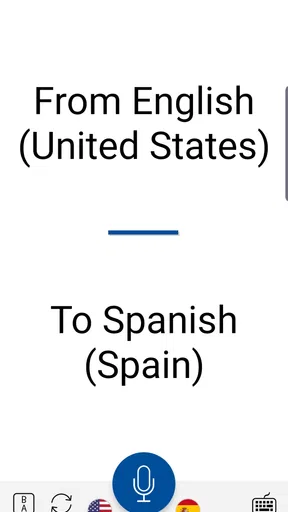
The user interface is as smooth as butter. I mean, even if you’re not a tech whiz, you’ll find it super easy to navigate. The design is clean, and everything you need is right at your fingertips. Just tap, speak, and voila! You’ve got your translation.
A Multitude of Languages
One word: versatility. This app supports a ton of languages, and I’m not just talking about the usual suspects like Spanish or French. We’re talking about a whole slew of languages, even the ones you’d least expect. It’s like having a mini United Nations in your pocket!
Offline Mode
This feature is a lifesaver when you’re in a place with sketchy Wi-Fi. You can download language packs in advance and use them whenever you’re off the grid. Perfect for when you’re in the middle of nowhere and need to ask for directions or order your favorite dish.
Accuracy and Speed
Now, I’ve tried a few translation apps in my time, and let me tell you, not all of them get it right. But the app is pretty spot-on. The translations are accurate, and the speed is impressive. No more awkward pauses while waiting for the app to catch up with your conversation.
Voice Recognition
Here’s another gem: the voice recognition feature. It picks up on your speech like a pro, even with accents and all. So whether you’re speaking with a thick Southern drawl or a fast-paced New Yorker vibe, this app’s got you covered.
Text Translation
Aside from voice, you can also snap a picture of text, and the app will translate it for you. This is super handy for reading menus, signs, or any other text you stumble upon during your adventures.
Why You Should Try It
So, why am I raving about this app? Because it genuinely makes life easier. Whether you’re traveling for leisure or business, or just trying to communicate with someone who speaks a different language, the app removes those pesky language barriers. Plus, it’s a great tool for learning a new language. You can practice pronunciation and get instant feedback, which is pretty neat.
In a nutshell, if you’re looking for a reliable, fast, and user-friendly translation app, give Instant Voice Translate a whirl. It’s like having a world of languages at your disposal, ready to help you navigate any situation with ease. So go ahead, download it, and start exploring the world without limits!
Cost, availability, and expectations
One practical point before installing: it is free to download, with in-app purchases ranging from $1.99 to $99.99 per item. I’d start with the free experience and decide whether any paid option matters to my routine rather than assuming I need to buy something just to test a simple conversation. The app is developed by Erudite, is rated for Everyone, and its current version is 13.0.2, with Android 6.0 as the minimum operating system.
Its reception is encouraging: it has a 4.8 average from around 305,000 ratings, with roughly 3,200 written reviews, and more than 10 million installs. Those figures suggest that many people have found it useful, but they don’t guarantee that every language pair or noisy setting will work equally well. I’d judge it against the situations I actually face, not the popularity alone.
Small habits that improve the result
There are a few simple ways I’d make a translation exchange smoother. I’d move somewhere quieter before speaking if I can, keep the phone close enough to pick up my voice, and avoid talking over the other person. I’d also leave a pause between turns instead of rushing into the next sentence. These aren’t hidden settings; they’re practical habits that reduce the chance of a messy exchange.
For directions, I’d ask for one landmark or one turn at a time, then repeat the key place name or destination to check I understood. For a taxi or pickup, showing the destination in text can be more dependable than trying to pronounce an unfamiliar street name. The best workflow is often a mix: voice for the back-and-forth, text for details both people need to see clearly.
Travelers should also consider how they’ll use the app before leaving home. If a trip includes long stretches without connectivity, it’s sensible to prepare any offline language support ahead of time and test it before depending on it. I wouldn’t assume every function behaves identically offline, so a quick trial with the intended language and task is a better plan than discovering the difference in the middle of a journey.
What the app cannot smooth over
Even a fast translation can miss humor, politeness, regional expressions, or the difference between a casual request and a firm instruction. That matters in conversations where tone is as important as the literal words. I’d avoid slang, idioms, and long explanations, and use plain wording instead. If the other person looks uncertain, I’d take that as a cue to rephrase rather than repeat the same sentence louder.
Voice input can also be awkward in places where speaking aloud feels intrusive, such as a quiet waiting room or a crowded bus. In those moments, typed or camera-based translation may be the more considerate choice. Likewise, when a conversation is private, I’d think carefully before putting sensitive details through any translation tool; a face-to-face interpreter or another trusted method may be more appropriate.
A sensible place in a travel toolkit
As a Travel & Local app, Instant Voice Translate makes the most sense as one part of a traveler’s toolkit, alongside saved addresses, offline maps, and basic preparation for the destination. It can help with a quick question at a station, a brief exchange at a shop, or understanding a printed notice. It cannot replace navigation, local knowledge, or a person who can handle a complex conversation from beginning to end.
Released on February 21, 2020, it has continued to develop through version 13.0.2. I’d still treat the app as a practical helper rather than a guarantee: keep important addresses written down, make sure the other person has time to read or hear the translation, and confirm details that affect safety or money. Those small safeguards make the convenience more dependable.
My recommendation
For a traveler who wants to handle short exchanges without turning every question into a typing exercise, I think this is a worthwhile app to try. Its combination of spoken interaction and camera-based text translation gives it a more useful role than a basic phrase lookup, especially when plans change and I need to understand something in front of me quickly.
I would skip it as my only solution for professional interpreting, high-stakes decisions, or detailed language study. But for everyday travel moments—finding a platform, checking a menu, or asking a shop assistant a straightforward question—it can lower the friction enough to make approaching someone feel easier. That, to me, is the meaningful benefit: not flawless conversation, but a practical first step toward one.
Pros
- Supports multiple languages seamlessly.
- User-friendly interface with intuitive design.
- Real-time translation is fast and accurate.
- Offline mode available for key languages.
- Voice recognition is highly accurate.
Cons
- Some translations may lack nuance.
- Occasional connectivity issues in offline mode.
- Premium features require a subscription.
- Limited customization options for interface.
- Voice accents can affect recognition accuracy.
FAQs for Instant Voice Translate
What languages does Instant Voice Translate support?
Instant Voice Translate supports a wide range of languages, providing users with the ability to translate speech in over 100 languages. This extensive list includes popular languages like Spanish, French, Chinese, and Arabic, ensuring that users can communicate effectively around the globe. The app continuously updates to include more languages as they become available.
How accurate are the translations provided by Instant Voice Translate?
The accuracy of translations in Instant Voice Translate is generally high, thanks to advanced machine learning algorithms. However, users should be aware that complex phrases and idiomatic expressions might not always translate perfectly. The app is ideal for day-to-day communication, but professional translation might be required for specialized contexts.
Is an internet connection required to use Instant Voice Translate?
Yes, Instant Voice Translate requires an internet connection to access its full range of features. The app relies on cloud-based processing to deliver accurate and fast translations. Some basic offline functionality might be available, but it is limited to pre-downloaded language packs and is best used with an internet connection for optimal performance.
Does Instant Voice Translate have a user-friendly interface?
Instant Voice Translate is designed with user experience in mind, offering a clean and intuitive interface. The app features easy navigation, allowing users to quickly select languages and start translating. Additionally, voice input is straightforward, making the app accessible for both tech-savvy users and beginners alike.
Are there any subscription fees or in-app purchases within Instant Voice Translate?
Instant Voice Translate offers a free version with essential features. However, users can opt for a subscription to access premium features such as ad-free usage, enhanced translation accuracy, and additional languages. While the basic version is sufficient for casual use, the premium subscription is a worthwhile investment for frequent travelers or professionals.


